NO.104 You have a Fabric tenant that contains a lakehouse named LH1.
You need to deploy a new semantic model. The solution must meet the following requirements:
* Support complex calculated columns that include aggregate functions, calculated tables, and Multidimensional Expressions (MDX) user hierarchies.
* Minimize page rendering times.
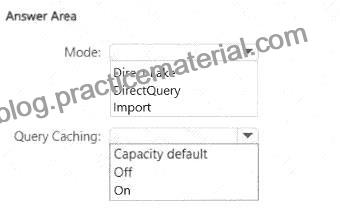
How should you configure the model? To answer, select the appropriate options in the answer area.
NOTE: Each correct selection is worth one point.
Explanation:

Supports complex calculated columns (with aggregate functions, calculated tables, MDX hierarchies).
Minimizes page rendering times .
Step 1 – Choosing the Mode
Direct Lake # Best for near real-time queries, avoids duplication, but has limitations (e.g., some complex calculated columns, MDX user hierarchies are not fully supported).
DirectQuery # Sends queries to the source each time. It supports complex expressions but is slow (not optimal for minimizing page rendering times).
Import # Data is loaded into VertiPaq in-memory engine, supports full DAX capabilities, calculated tables, MDX hierarchies, and provides fastest query performance .
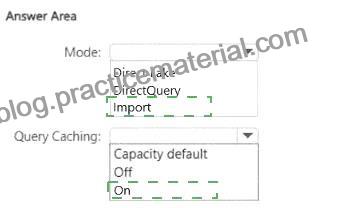
# Correct choice: Import .
Step 2 – Choosing Query Caching
Capacity default # Relies on the workspace/capacity setting.
Off # Disables caching, which could slow down report rendering.
On # Ensures queries are cached for faster page rendering times.
# Correct choice: On .
Mode: Import
Query Caching: On
References:
Semantic model storage modes in Fabric
Query caching in Power BI / Fabric
