NO.145 Hotspot Question
You have an Azure SQL database named db1 on a server named server1.
You use Query Performance Insight to monitor db1.
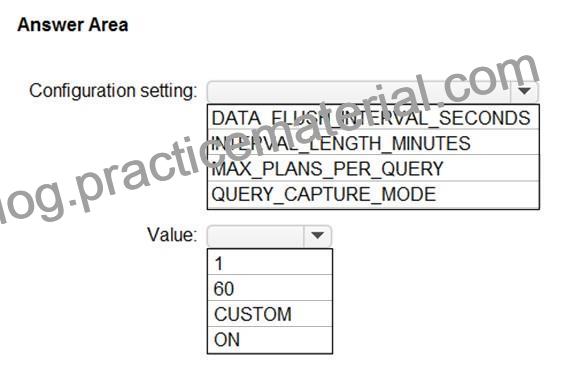
You need to modify the Query Store configuration to ensure that performance monitoring data is available as soon as possible.
Which configuration setting should you modify and which value should you configure? To answer, select the appropriate options in the answer area.
NOTE: Each correct selection is worth one point.
Explanation:
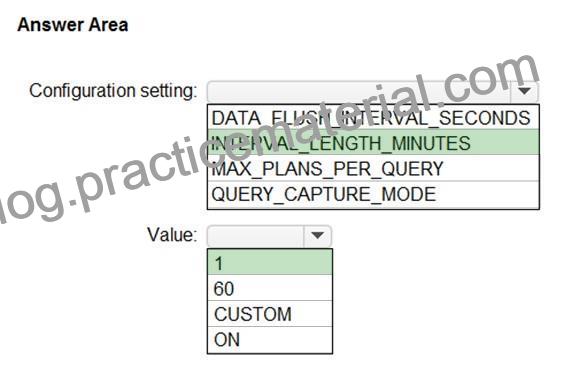
Box 1: INTERVAL_LENGTH_MINUTES
INTERVAL_LENGTH_MINUTES defines size of time window during which collected runtime statistics for query plans are aggregated and persisted. Every active query plan has at most one row for a period of time defined with this configuration.
Default: 60
Box 2: 1
Statistics Collection Interval (INTERVAL_LENGTH_MINUTES): Defines the level of granularity for the collected runtime statistic, expressed in minutes. The default is 60 minutes. Consider using a lower value if you require finer granularity or less time to detect and mitigate issues.
Use SQL Server Management Studio or Transact-SQL to set a different value for Statistics Collection Interval:
ALTER DATABASE [QueryStoreDB]
SET QUERY_STORE (INTERVAL_LENGTH_MINUTES = 60);
Reference:
https://docs.microsoft.com/en-us/sql/relational-databases/performance/best-practice-with-the-query-store
NO.147 HOTSPOT
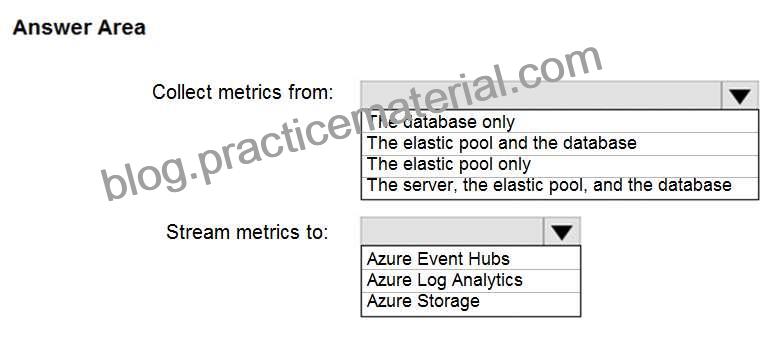
You need to implement the monitoring of SalesSQLDb1. The solution must meet the technical requirements.
How should you collect and stream metrics? To answer, select the appropriate options in the answer area.
NOTE: Each correct selection is worth one point.
Hot Area:
Explanation:
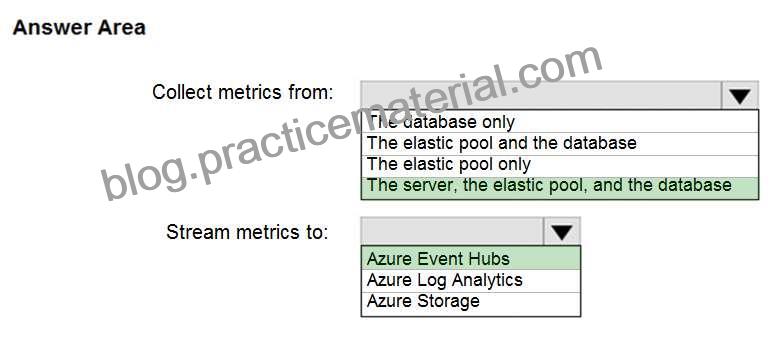
Box 1: The server, the elastic pool, and the database
Senario:
SalesSQLDb1 is in an elastic pool named SalesSQLDb1Pool.
Litware technical requirements include: all SQL Server and Azure SQL Database metrics related to CPU and storage usage and limits must be analyzed by using Azure built-in functionality.
Box 2: Azure Event hubs
Scenario: Migrate ManufacturingSQLDb1 to the Azure virtual machine platform.
Event hubs are able to handle custom metrics.
Incorrect Answers:
Azure Log Analytics
Azure metric and log data are sent to Azure Monitor Logs, previously known as Azure Log Analytics, directly by Azure. Azure SQL Analytics is a cloud only monitoring solution supporting streaming of diagnostics telemetry for all of your Azure SQL databases.
However, because Azure SQL Analytics does not use agents to connect to Azure Monitor, it does not support monitoring of SQL Server hosted on-premises or in virtual machines.
Monitor and Optimize Operational Resources
Question Set 2
NO.149 SIMULATION
You have a legacy application written for Microsoft SQL Server 2012. The application will be the only application that accesses db1.
You need to ensure that db1 is compatible with all the features and syntax of SQL Server 2012.
To complete this task, sign in to the virtual machine. You may need to use SQL Server Management Studio and the Azure portal.
View or change the compatibility level of a database
You can view or change the compatibility level of a database in SQL Server, Azure SQL Database, or Azure SQL Managed Instance by using SQL Server Management Studio or Transact-SQL.
Use SQL Server Management Studio
To view or change the compatibility level of a database using SQL Server Management Studio (SSMS) Step 1: Connect to the appropriate server or instance hosting your database [Here db1].
Step 2: Select the server name in Object Explorer.
Step 3: Expand Databases, and, depending on the database, either select a user database or expand System Databases and select a system database.
Step 4: Right-click the database, and then select Properties.
The Database Properties dialog box opens.
Step 5: In the Select a page pane, select Options.
The current compatibility level is displayed in the Compatibility level list box.
Step 6: To change the compatibility level, select a different option from the list [Select SQL Server 2012]
Reference:
https://learn.microsoft.com/en-us/sql/relational-databases/databases/view-or-change-the-compatibility-level-of-a-database
NO.155 Note: This question is part of a series of questions that present the same scenario. Each question in the series contains a unique solution that might meet the stated goals. Some question sets might have more than one correct solution, while others might not have a correct solution.
After you answer a question in this section, you will NOT be able to return to it. As a result, these questions will not appear in the review screen.
You have an Azure Synapse Analytics dedicated SQL pool that contains a table named Table1.
You have files that are ingested and loaded into an Azure Data Lake Storage Gen2 container named container1.
You plan to insert data from the files into Table1 and transform the data. Each row of data in the files will produce one row in the serving layer of Table1.
You need to ensure that when the source data files are loaded to container1, the DateTime is stored as an additional column in Table1.
Solution: In an Azure Synapse Analytics pipeline, you use a Get Metadata activity that retrieves the DateTime of the files.
Does this meet the goal?
Instead use a serverless SQL pool to create an external table with the extra column.
Reference:
https://docs.microsoft.com/en-us/azure/synapse-analytics/sql/create-use-external-tables Basic Concept: This question tests monitor, configure, and optimize database resources in the DP-300 exam context. The correct choice is determined by the exact service boundary and operational requirement stated in the scenario.
Why B is Correct: No is related to operational monitoring or tuning, but it must match the exact signal needed: query history, resource utilization, wait/blocking detail, or automatic remediation. The scenario asks for: Each question in the series contains a unique solution that might meet the stated goals. That makes No the option that satisfies the required Azure SQL layer and operational outcome.
Why A is Wrong: Yes is related to operational monitoring or tuning, but it must match the exact signal needed: query history, resource utilization, wait/blocking detail, or automatic remediation. It does not expose the required metric, query history, wait/blocking signal, or tuning mechanism; using it would not give the administrator the evidence requested.
NO.156 Note: This question is part of a series of questions that present the same scenario. Each question in the series contains a unique solution that might meet the stated goals. Some question sets might have more than one correct solution, while others might not have a correct solution.
After you answer a question in this section, you will NOT be able to return to it. As a result, these questions will not appear in the review screen.
You have SQL Server 2019 on an Azure virtual machine.
You are troubleshooting performance issues for a query in a SQL Server instance.
To gather more information, you query sys.dm_exec_requests and discover that the wait type is PAGELATCH_UP and the wait_resource is 2:3:905856.
You need to improve system performance.
Solution: You shrink the transaction log file.
Does this meet the goal?
datab
Reference:
https://docs.microsoft.com/en-US/troubleshoot/sql/performance/recommendations-reduce-allocation- contention Basic Concept: This question tests database auditing and query visibility. DP-300 expects you to distinguish between collecting audit events, retaining logs, and analyzing query behavior.
Why B is Correct: No is related to operational monitoring or tuning, but it must match the exact signal needed: query history, resource utilization, wait/blocking detail, or automatic remediation. This fits the case because the requested outcome is: Each question in the series contains a unique solution that might meet the stated goals. The selected feature addresses that outcome directly rather than relying on a workaround.
Why A is Wrong: Yes is related to operational monitoring or tuning, but it must match the exact signal needed: query history, resource utilization, wait/blocking detail, or automatic remediation. It is useful in other troubleshooting paths, but this scenario requires a more specific monitoring or optimization feature.
NO.157 You have an Azure subscription that uses a domain named contoso.com.
You have two Azure VMs named DBServer1 and DBServer2. Each of them hosts a default SQL Server instance. DBServer1 is in the East US Azure region and contains a database named DatabaseA. DBServer2 is in the West US Azure region.
DBServer1 has a high volume of data changes and low latency requirements for data writes.
You need to configure a new availability group for DatabaseA. The secondary replica will reside on DBServer2.
What should you do?
Reference:
https://docs.microsoft.com/en-us/sql/database-engine/availability-groups/windows/availability-modes-always- on-availability-groups?view=sql-server-ver15 Basic Concept: This question tests high availability and disaster recovery design for Azure SQL, SQL Server on Azure VMs, and regional failure scenarios.
Why C is Correct: Configure the primary endpoint as TCP://DBServer1.contoso.com:5022, configure the secondary endpoint as TCP://DBServer2.contoso.com:5022, and set the availability mode to Asynchronous. is part of the availability or recovery design space, but the correct choice must satisfy the specified failover, restore, quorum, RPO, or RTO requirement. This fits the case because the requested outcome is: DBServer1 has a high volume of data changes and low latency requirements for data writes. The selected feature addresses that outcome directly rather than relying on a workaround.
Why A is Wrong: Configure the primary endpoint as TCP://DBServer1.contoso.com:445, configure the secondary endpoint as TCP://DBServer2.contoso.com:445, and set the availability mode to Asynchronous. is part of the availability or recovery design space, but the correct choice must satisfy the specified failover, restore, quorum, RPO, or RTO requirement. It is not wrong technology in general, but it is the wrong HA/DR control for this scenario ‘ s failure model.
Why B is Wrong: Configure the primary endpoint as TCP://DBServer1.contoso.com:445, configure the secondary endpoint as TCP://DBServer2.contoso.com:445, and set the availability mode to Synchronous. is part of the availability or recovery design space, but the correct choice must satisfy the specified failover, restore, quorum, RPO, or RTO requirement. It does not meet the failover, restore, quorum, or cross-region continuity target stated in the question, even if it is valid in a different availability design.
Why D is Wrong: Configure the primary endpoint as TCP://DBServer1.contoso.com:5022, configure the secondary endpoint as TCP://DBServer2.contoso.com:5022, and set the availability mode to Synchronous. is part of the availability or recovery design space, but the correct choice must satisfy the specified failover, restore, quorum, RPO, or RTO requirement. It is not wrong technology in general, but it is the wrong HA/DR control for this scenario ‘ s failure model.
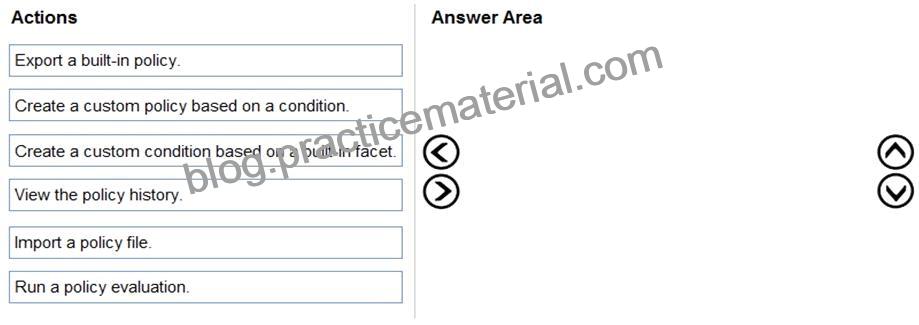
NO.160 You have SQL Server on an Azure virtual machine.
You need to use Policy-Based Management in Microsoft SQL Server to identify stored procedures that do not comply with your naming conventions.
Which three actions should you perform in sequence? To answer, move the appropriate actions from the list of actions to the answer area and arrange them in the correct order.
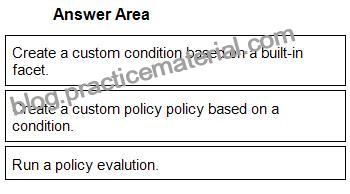
1 – Create a custom condition based on a built-in facet.
2 – Create a custom policy policy based on a condition.
3 – Run a policy evalution.
Reference:
https://www.mssqltips.com/sqlservertip/2298/enforce-sql-server-database-naming-conventions-using-policy-based-management/
